> ## Documentation Index
> Fetch the complete documentation index at: https://docs.gamerhash.com/llms.txt
> Use this file to discover all available pages before exploring further.
# Overview
> The flagship app — what it does, how it earns, and what hardware you need.
export const Win = () => Windows;
The **GamerHash AI App** is a free desktop application that does two things at once:
1. **Lets you use private AI tools locally** — chat, image, video, voice — all running on your own GPU, without sending data to a third-party cloud.
2. **Lets you earn from idle GPU time** — opt in and the app dispatches AI inference jobs from the network onto your machine. You're paid in **GUSD** per workload, and you accrue **GHXP** every minute the app runs (even when there's no work in the queue) — those points scale your share of network rewards.
Same app, same install, same login. You decide whether to use it as a private AI workstation, an earning machine, or both.
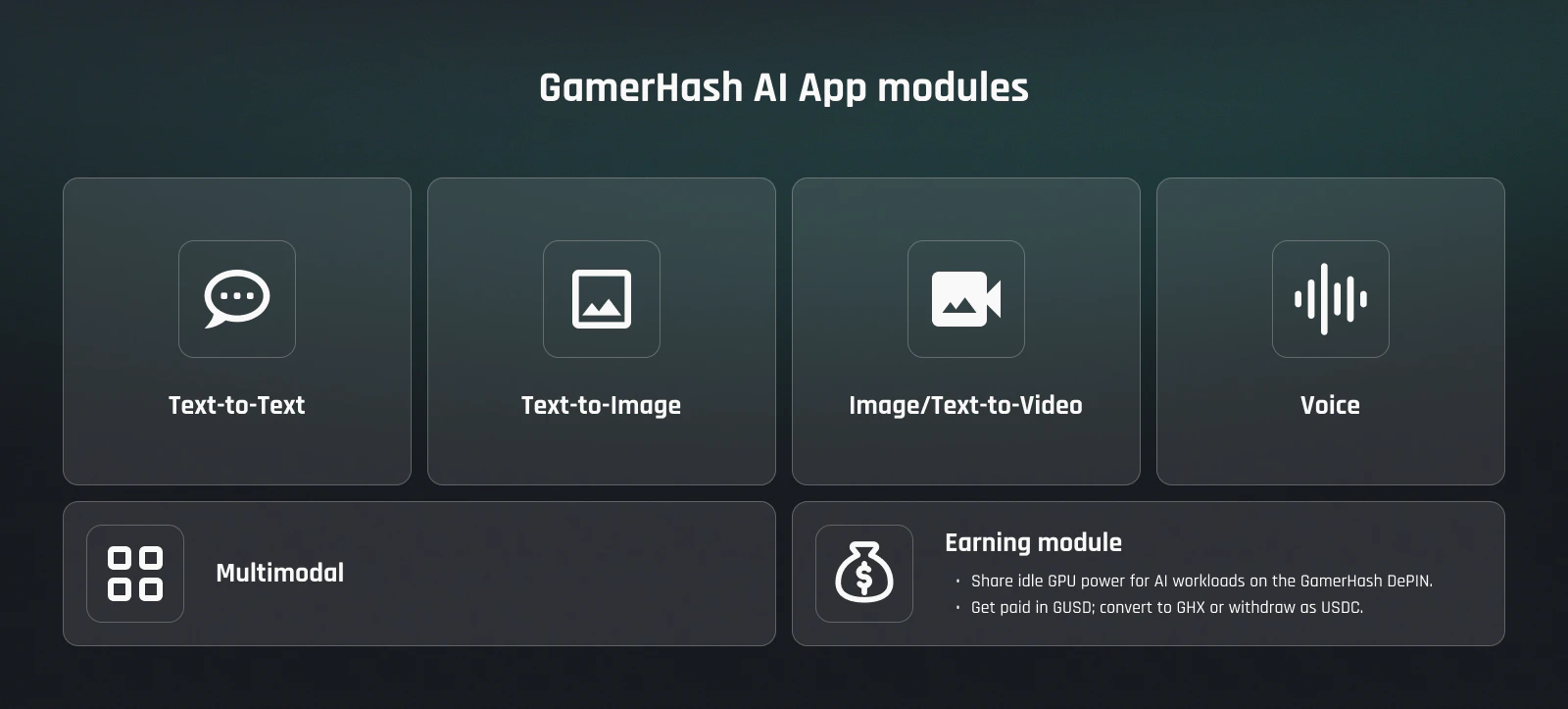 ## What's inside
Text-to-text, text-to-image, text/image-to-video, voice — every module the app ships.
Run the app + hold GHX → higher reward share. Feeds into seasonal GHX payouts.
GUSD per workload, GHXP level, and the path from credit to spendable assets.
Minimum and recommended GPUs for chat, image, and video.
What stays on your machine, what's transmitted, what's logged.
Five-minute walkthrough — download to first run.
## Why local AI
Cloud AI services come with three structural costs that GamerHash AI removes:
* **Per-token pricing.** Cloud providers charge per call, per token, per second. The AI App is free for personal use — your only cost is electricity and the GPU you already own.
* **Privacy compromises.** Prompts and outputs are transmitted to third-party clouds and may be logged. The AI App generates entirely locally — nothing leaves your machine when you're using personal-use modules.
* **Usage limits.** Free tiers cap message counts, resolution, and rate. The AI App has no usage caps for local-only modules — your GPU is the only limiter.
## Why share GPU?
A modern gaming GPU is idle most of the time it's powered on. The earning module dispatches AI inference jobs from network buyers — developers, applications, and direct AI partners — onto your machine while you're not using it.
You don't pick the workloads — the network routes whatever fits your VRAM and the queue depth. You earn **GUSD per workload completed**, with a **GHXP-based multiplier** for consistent, high-engagement contributors. Active contributors also share the seasonal **GHX reward pool** — see [GHXP seasons](/ai/ghxp#seasons).
## What you need
* **Windows 10 or 11**
* **NVIDIA RTX GPU with 8 GB+ VRAM** to run the app locally. Earning from network workloads requires **16 GB+ VRAM** — anything below is local-use only for now.
* **Recent NVIDIA driver** (the app prompts if your driver is too old)
* **A GamerHash account** (created on first run; email or Google sign-in)
Detailed hardware breakdown — including which models run on 8 GB vs 12 GB vs 24 GB — is in [Hardware requirements](/ai/hardware-requirements).
## Get going
Direct download from gamerhash.com.
Walk through the install with screenshots and gotchas.
See current network capacity — devices, GPUs, VRAM, throughput.
From install to first GUSD payout — what to expect on day one.
## Further reading
Why the same idle-GPU thesis works better for AI inference than for PoW hashes — written by the team.
Monthly community recaps, deep dives, and partnership announcements.
## What's inside
Text-to-text, text-to-image, text/image-to-video, voice — every module the app ships.
Run the app + hold GHX → higher reward share. Feeds into seasonal GHX payouts.
GUSD per workload, GHXP level, and the path from credit to spendable assets.
Minimum and recommended GPUs for chat, image, and video.
What stays on your machine, what's transmitted, what's logged.
Five-minute walkthrough — download to first run.
## Why local AI
Cloud AI services come with three structural costs that GamerHash AI removes:
* **Per-token pricing.** Cloud providers charge per call, per token, per second. The AI App is free for personal use — your only cost is electricity and the GPU you already own.
* **Privacy compromises.** Prompts and outputs are transmitted to third-party clouds and may be logged. The AI App generates entirely locally — nothing leaves your machine when you're using personal-use modules.
* **Usage limits.** Free tiers cap message counts, resolution, and rate. The AI App has no usage caps for local-only modules — your GPU is the only limiter.
## Why share GPU?
A modern gaming GPU is idle most of the time it's powered on. The earning module dispatches AI inference jobs from network buyers — developers, applications, and direct AI partners — onto your machine while you're not using it.
You don't pick the workloads — the network routes whatever fits your VRAM and the queue depth. You earn **GUSD per workload completed**, with a **GHXP-based multiplier** for consistent, high-engagement contributors. Active contributors also share the seasonal **GHX reward pool** — see [GHXP seasons](/ai/ghxp#seasons).
## What you need
* **Windows 10 or 11**
* **NVIDIA RTX GPU with 8 GB+ VRAM** to run the app locally. Earning from network workloads requires **16 GB+ VRAM** — anything below is local-use only for now.
* **Recent NVIDIA driver** (the app prompts if your driver is too old)
* **A GamerHash account** (created on first run; email or Google sign-in)
Detailed hardware breakdown — including which models run on 8 GB vs 12 GB vs 24 GB — is in [Hardware requirements](/ai/hardware-requirements).
## Get going
Direct download from gamerhash.com.
Walk through the install with screenshots and gotchas.
See current network capacity — devices, GPUs, VRAM, throughput.
From install to first GUSD payout — what to expect on day one.
## Further reading
Why the same idle-GPU thesis works better for AI inference than for PoW hashes — written by the team.
Monthly community recaps, deep dives, and partnership announcements.