> ## Documentation Index
> Fetch the complete documentation index at: https://docs.gamerhash.com/llms.txt
> Use this file to discover all available pages before exploring further.
# Earning model
> How GPU sharing pays — GUSD per workload, GHXP multipliers, and what to do with the credit.
The earning module turns the AI App from a free local-AI workstation into a side income. Once you're at the [AI OPTIMAL](/ai/hardware-requirements#ai-optimal--earn-from-gpu-sharing) hardware bar and opted in, two streams pay you:
* **GUSD per workload** — credited continuously as inference jobs complete on your GPU.
* **GHX from the seasonal pool** — every two months, your locked GHXP determines your share of the season's GHX pool. See [GHXP seasons](/ai/ghxp#seasons).
You opt in once; the network does the rest.
 ## Setup
Five steps from cold install to first paycheck:
1. **Download the AI App** — free Windows installer from [gamerhash.com](https://gamerhash.com/en/app-download).
2. **Log in** — email or Google sign-in. The account is created on first run if you don't have one yet.
3. **Install the EARN module** — turn it on inside the app; required components download automatically.
4. **Download a model pack** — **Basic** to get started, or **Full** to qualify for the highest-paying workload classes.
5. **Wait for assignment** — the network dispatches jobs to your machine automatically whenever there's a fit for your VRAM and you're online. You're paid in **GUSD** as each one completes.
No queue tuning, no manual job acceptance, no per-task setup. Leave the machine on — most pay comes from being online when a workload arrives.
## What determines per-machine yield
Yield depends on a handful of variables — not all under your control:
* **GPU class & VRAM** — earning starts at **16 GB VRAM**; bigger memory unlocks higher-paying workload classes. See [hardware requirements](/ai/hardware-requirements).
* **Uptime** — more hours online = more workloads matched.
* **GHXP level** — long-running, GHX-holding accounts earn more per workload.
* **Locked GHXP at season close** — your slice of the seasonal GHX pool depends on how much GHXP you've committed.
* **Network demand** — pay scales with how much compute the network sells. As demand grows, contributor pay grows.
The dashboard inside the AI App shows live per-hour earnings and historical totals.
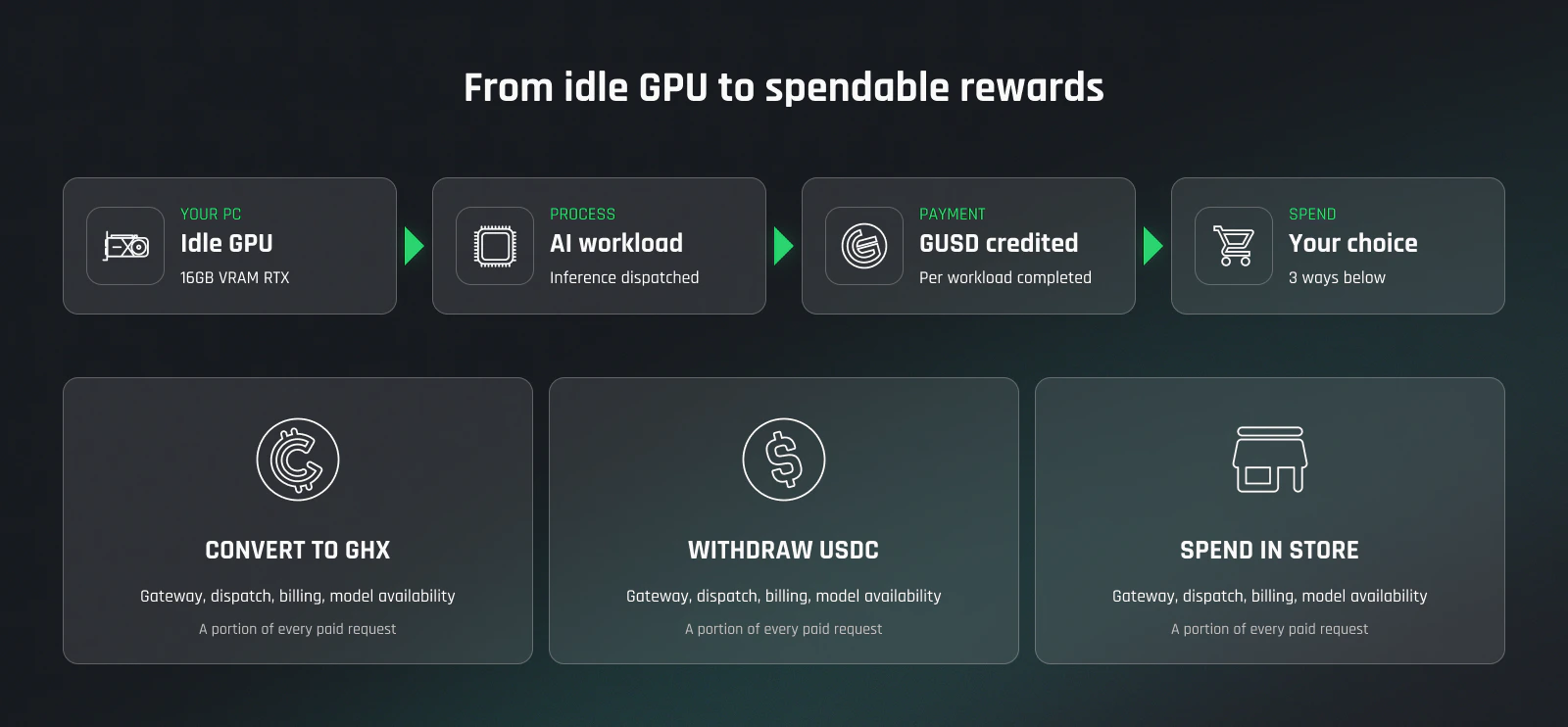
## What you can do with GUSD
GUSD is the platform's internal earning currency. Three exit routes:
HODL on Ethereum, BNB Chain, or Solana. Stake or LP for up to 25% APR — see [GHX staking docs](https://docs.gamercoin.com/tokenomics/staking).
Out to any BNB Chain wallet — your Binance deposit address, MetaMask on BSC, or any BEP-20 wallet. No GamerHash fee.
600+ digital goods — games, gift cards, prepaid vouchers. Browse the [Store](https://gamerhash.com/en/shop).
## What this is *not*
* **Not mining.** No PoW, no hash rates, no algorithm tuning. The platform serves AI inference jobs.
* **Not crypto trading.** GUSD is an internal earning credit; converting to GHX is optional, not required to be paid.
* **Not guaranteed.** Yield depends on network demand. There are no fixed APRs on the earning side — APR exists only on the [staking](https://docs.gamercoin.com/tokenomics/staking) side.
## Optimization tips
* **Run the app continuously** — most pay comes from being online when a workload arrives.
* **Hold some GHX in MetaMask or your in-app wallet** for the GHXP Boost (see [GHXP](/ai/ghxp)) — and keep MetaMask connected, otherwise the boost turns off.
* **Lock your GHXP each season** — accumulated GHXP only earns you a slice of the GHX pool if you actually lock it.
* **Just leave it running when you're not gaming** — launching a game pushes the module out automatically, no scheduling required.
* **Update the driver and the app** — performance improvements ship constantly; out-of-date stacks miss workloads.
## Further reading
The token-side view of why holding GHX matters — utility, supply, GHXP boost.
Why the same idle-GPU thesis pays better as AI inference than as PoW hashes.
## Next
AI READY vs AI OPTIMAL — what your GPU qualifies for.
How GHXP accrues, locks each season, and translates into GHX payouts.
What's transmitted, what's logged, what stays local.
Per-GPU yield estimate based on current network demand.
## Setup
Five steps from cold install to first paycheck:
1. **Download the AI App** — free Windows installer from [gamerhash.com](https://gamerhash.com/en/app-download).
2. **Log in** — email or Google sign-in. The account is created on first run if you don't have one yet.
3. **Install the EARN module** — turn it on inside the app; required components download automatically.
4. **Download a model pack** — **Basic** to get started, or **Full** to qualify for the highest-paying workload classes.
5. **Wait for assignment** — the network dispatches jobs to your machine automatically whenever there's a fit for your VRAM and you're online. You're paid in **GUSD** as each one completes.
No queue tuning, no manual job acceptance, no per-task setup. Leave the machine on — most pay comes from being online when a workload arrives.
## What determines per-machine yield
Yield depends on a handful of variables — not all under your control:
* **GPU class & VRAM** — earning starts at **16 GB VRAM**; bigger memory unlocks higher-paying workload classes. See [hardware requirements](/ai/hardware-requirements).
* **Uptime** — more hours online = more workloads matched.
* **GHXP level** — long-running, GHX-holding accounts earn more per workload.
* **Locked GHXP at season close** — your slice of the seasonal GHX pool depends on how much GHXP you've committed.
* **Network demand** — pay scales with how much compute the network sells. As demand grows, contributor pay grows.
The dashboard inside the AI App shows live per-hour earnings and historical totals.
## What you can do with GUSD
GUSD is the platform's internal earning currency. Three exit routes:
HODL on Ethereum, BNB Chain, or Solana. Stake or LP for up to 25% APR — see [GHX staking docs](https://docs.gamercoin.com/tokenomics/staking).
Out to any BNB Chain wallet — your Binance deposit address, MetaMask on BSC, or any BEP-20 wallet. No GamerHash fee.
600+ digital goods — games, gift cards, prepaid vouchers. Browse the [Store](https://gamerhash.com/en/shop).
## What this is *not*
* **Not mining.** No PoW, no hash rates, no algorithm tuning. The platform serves AI inference jobs.
* **Not crypto trading.** GUSD is an internal earning credit; converting to GHX is optional, not required to be paid.
* **Not guaranteed.** Yield depends on network demand. There are no fixed APRs on the earning side — APR exists only on the [staking](https://docs.gamercoin.com/tokenomics/staking) side.
## Optimization tips
* **Run the app continuously** — most pay comes from being online when a workload arrives.
* **Hold some GHX in MetaMask or your in-app wallet** for the GHXP Boost (see [GHXP](/ai/ghxp)) — and keep MetaMask connected, otherwise the boost turns off.
* **Lock your GHXP each season** — accumulated GHXP only earns you a slice of the GHX pool if you actually lock it.
* **Just leave it running when you're not gaming** — launching a game pushes the module out automatically, no scheduling required.
* **Update the driver and the app** — performance improvements ship constantly; out-of-date stacks miss workloads.
## Further reading
The token-side view of why holding GHX matters — utility, supply, GHXP boost.
Why the same idle-GPU thesis pays better as AI inference than as PoW hashes.
## Next
AI READY vs AI OPTIMAL — what your GPU qualifies for.
How GHXP accrues, locks each season, and translates into GHX payouts.
What's transmitted, what's logged, what stays local.
Per-GPU yield estimate based on current network demand.